
Pipeline Stages#
Stage $group#
Example {"$group":{"group_cxs": ["c0"], "c1": "sum"}}
The $group stage will merge multiple rows together that have the same (compound-)key. Different operators are available to define how the individual values should be merged. Note that this can also be used to add new columns to the row.
Parameter group_cxs: (list of strings) defines the compound key columns .e.g [“c0”] or [“c0”, “c1”]
Parameter c0-99: (string (operator)) defines how the values should be merged, if omitted a single value of a random row will be used.
Merge Operator first: the default operator take the value form the first matched row (rows are not sorted).
Merge Operator sum: creates a sum of all number values
Merge Operator avg: creates a average of all number values
Merge Operator count: counts the merged rows
Merge Operator min: provides the minimum of all number values
Merge Operator max: provides the maximum of all number values
Merge Operator bool_and: and operator, all values in the column must be bools or null
Merge Operator bool_or: or operator, all values in the column must be bools or null
Merge Operator list: builds a list of the values
Merge Operator list_unique: builds a list of the values, but values in the list will be unique
Merge Operator merge: for subtables, merges the subtables into one
Stage $filter#
Example {"$filter":{"c2": "summer"}}
A filter as known. Syntax is checked, only c0-99 are allowed as keys. Allowed operators are "$eq", "$in", "$gt", "$gte", "$lt", "$lte", "$regex", "$ne"
Parameter match_any (bool) if set, all defined conditions in the filter are combined with an $or operator.
Example: match all c0 smaller than -10 or larger than +10
{"$filter":{"match_any": true, "c0": {"$gt": 10, "$lt": -10}}
The $filter stage allows the usage of placeholders. Placeholders are defined in the filter with double $$ signs. The pipeline_placeholders parameter must be specified to define the values:
{
    "pipeline_placeholders": [
        {
            "display_name": "area codes",
            "description": "all the area codes to export",
            "display_type": "list",
            "placeholder": "$$area_codes",
            "value": ["534", "523"]
        }
    ]
}
A filter example that uses a placeholder could look like this: {"$filter":{"c0": {"$in": "$$area_codes"}}}
Note: only the placeholder and value properties are used by the get_rows api, the other fields are recommendations for storage in exporter presets.
Stage $group_subtable#
This is very similar to the regular $group stage, but operates on subtables instead. The only additional parameter is:
Additional Parameter subtable_cx (string) the cx where the subtable ist stored.
Parameter subtable_col_count: (integer) The number of columns in the subtable. REQUIRED IF the subtable_cx is NOT an actual subtable of the main table, but the result of a previous stage.
Example: {"$group_subtable": {"subtable_cx": "c3", "group_cxs": ["c0", "c3"], "c1": "sum"}}
Stage $filter_subtable#
The same as a regular $filter stage, but can remove rows from subtables instead.
Additional Parameter subtable_cx (string) the cx where the subtable ist stored.
Example (with placeholder too): {"$filter_subtable": {"subtable_cx": "c3", "filter": {"c2": "$$product_type"}}}
Stage $expand#
Example: {"$expand": {"subtable_cx": "c4"}}
Produces ‘main rows’ from subtable rows. Takes all Subtablerows from all input rows, and returns one row per subtable row. All main row data is discarded and further processing can be done on the subtable rows as if they were regular rows.
Parameter subtable_cx (string) the cx of the subtable to expand.
Parameter subtable_col_count: (integer) The number of columns in the subtable. REQUIRED IF the subtable_cx is NOT an actual subtable of the main table, but the result of a previous stage.
Stage $collapse#
Example: {"$collapse": {"c1": "sum"}}
Very similar to $group, but will merge all input rows into one. All parameters and operators are the same, except that group_cxs doesn’t exist in this stage.
Stage $project#
Keep only some of the columns for further processing. Can be used to improve performance.
Example {"$project": {"keep": ["c0", "c1", "c2", "c3", "c4"]}}
Parameter keep (list of cx), these columns well be kept as-is, all other will be removed.
Stage $lookup#
Looking up documents from another table. You can define a column where the output of the lookup should reside.
Example {"$lookup": {"c3": {"foreign_table_id": "66BDC0A1336741D0C05F350311F269D9", "foreign_cx": "c0", "local_cx": "c1"}}}
Parameter cx: where to put the result
Parameter foreign_table_id: id of the other table
Parameter local_cx: cx in the main table that contains a key
Parameter foreign_cx: cx in the other table that has to match the key
Parameter filter: same style filter as the other filter stages, will be applied to the foreign table before matching objects to the local documents
Parameter add_fields: allows adding fields to each subtable row, accepts same configuration object as the $addFields stage
Parameter pass_main_cxs: a list of cx. This allows setting local/main row values into the subtable rows from the lookup.
Example 2: usage of all available parameters
{
    "$lookup": {
        "c3": {
            "foreign_table_id": "66BDC0A1336741D0C05F350311F269D9",
            "foreign_cx": "c0",
            "local_cx": "c1",
            "pass_main_cx": ["c23"]
            "add_fields": {
                "c3": "$$main_c23"
                "c4": { "$concat": ["Discount: ", {"$toString": {"$multiply": ["$$main_c23", "$c2"]}}]}
            }
        }
    }
}
{ "c0": "id1", "c1": "order_1", "c23": 3.0 }
{ "c0": "order_1", "c1": "item 1", "c2": 12.99 }
{ "c0": "order_1", "c1": "item 2", "c2": 7.99 }
{
    "c0": "id1",
    "c1": "order_1",
    "c23": 3.0,
    "c4": [
        { "c0": "order_1", "c1": "item 1", "c2": 12.99, "c3": 3.0, "c4": "Discount: 0.3897" }
        { "c0": "order_1", "c1": "item 2", "c2": 7.99 , "c3": 3.0, "c4": "Discount: 0.2397" }
    ]
}
Stage $unpack#
Retrieve a single value from a subtable and put it in the main row. The first entry in the subtable is used to extract the value. This is most useful when the subtable contains only one row and you want to use a value from that in the main row.
Example {"$unpack": {"c4":{"subtable_cx": "c99", "unpack_cx": "c2"}}} takes value c2 from the subtable’s (c99) first row and puts it in c4
Parameter cx: where to put the result
Parameter subtable_cx: where the subtable resides
Parameter unpack_cx: which column to take form the subtable
Stage $addFields#
Specify a source and target cx, so new field(s) will be added to the rows. Source cx may be from a main row, while target cx can be either a main row cx, or with dot notation a subtable field (cx.cy). When a subtable field is used as target, all rows in the subtable will receive the identical new value. More than one target/source pair can be added in a single stage.
Example 1 {"$addFields": {"c4.c3": "c2"} adds new field c3 to subtable at c4 with value from main rows c2
Parameter cx (1): where to put the result
Parameter cx (2): where to get the value from
addFields may also accept any mongodb expression inside an object instead of the c2 of the example. E.g. the following is valid:
Example 2:
{
    "$addFields": {
        "c4": {
            "$cond": { "if": { "$gte": [ "$c1", 250 ] }, "then": true, "else": false }
        }
    }
}
This will set c4 to true or false depending on the value of c1
Stages $multiply, $divide, $subtract, $add, $min, $max, $avg, $size, $sum#
Note
These will be executed in mongodb as opposed to the final_compute stage.
Note
Pay attention to the two different command input syntax styles, and which command allow which style.
Usage style list of colunns as input:
Example:
{"$sum": {"c99": ["c4", "c5"]}}assuming c4 and c5 are numbers, builds the sum and then puts result in c99
Usage style single column as input (this column should be a list of numbers):
Example:
{"$sum": {"c98": "c56"}}assuming c56 is an array of numbers, builds the sum of them and puts the result in c98
$multiply: exactly two values
Only list of colmns style is allowed. Exactly two columns must be specified.
Example:
{"$multiply": {"c99": ["c4", "c5"]}}
$divide: exactly two values
Only list of colmns style is allowed. Exactly two columns must be specified.
Example:
{"$divide": {"c99": ["c4", "c5"]}}
$subtract: exactly two values
Only list of colmns style is allowed. Exactly two columns must be specified.
Example:
{"$subtract": {"c99": ["c4", "c5"]}}
$add: exactly two values
Only list of colmns style is allowed. Exactly two columns must be specified.
Example:
{"$add": {"c99": ["c4", "c5"]}}
$min: finds minimum value in the input
BOTH types list of columns and single column are supported.
Example 1:
{"$min": {"c99": ["c4", "c5"]}}Example 2:
{"$min": {"c99": "c6"}}
$max: finds maximum value in the input
BOTH types list of columns and single column are supported.
Example 1:
{"$max": {"c99": ["c4", "c5"]}}Example 2:
{"$max": {"c99": "c6"}}
$avg: finds average value of all input numbers
BOTH types list of columns and single column are supported.
Example 1:
{"$avg": {"c99": ["c4", "c5"]}}Example 2:
{"$avg": {"c99": "c6"}}
$sum: build the sum over all input numbers
BOTH types list of columns and single column are supported.
Example 1:
{"$sum": {"c99": ["c4", "c5"]}}Example 2:
{"$sum": {"c99": "c6"}}
$size: returns the number of elements in a list
ONLY single column style supported.
Example:
{"$size": {"c99": "c6"}}
$concatArrays: performs a horizontal merge of subtables into a new column
Only list of colmns style is allowed. At least two columns must be specified.
Example 1:
{"$concatArrays": {"c99": ["c4", "c5"]}}Note: c4 and c5 in the example would contain a subtable
Note: The target column c99 must be different that the source columns
Note: It’s best practice to merge only subtables of the same type or the result data will be difficult to work with
Note
In the above examples assume that: c4/c5 = numbers and c6 = list of numbers
Stage $sort_limit#
First limits the number of documents in the pipeline and then sorts the remaining. It is also possible to define the apis limit and skip parameters instead, they will be added as a pipeline step at the end of the mongodb pipeline. Use separate $sort and $limit stages if you need to sort the whole working set.
Example {"$sort_limit": {"sort_by": "c0", "sort_dir": 1, "limit": 12}}
Parameter sort_by: sort by this cx
Parameter sort_dir: 1 or -1
Parameter limit: only return this number of documents
Stage $sort#
Sorts the whole current working set of documents. Note that following stages will randomize the order again.
Example {"$sort": {"sort_by": "c0", "sort_dir": 1}}
Parameter sort_by: sort by this cx
Parameter sort_dir: 1 or -1
Stage $skip#
The first n documents in the result so far will be skipped (not passed to the next pipeline stage).
Example {"$skip": {"skip": 12}}
Parameter skip: number of documents to skip
Stage $limit#
Reduces the list of documents in the pipeline, passes only the first n documents to the next stage.
Example {"$limit": {"limit": 12}}
Parameter limit: number of documents
Stage $url_link#
Build a column of type url_link from two separate columns that contain the title and the url.
Example {"$url_link": {"c4": {"title_cx": "c1", "url_cx": "c0"}}}
Parameter cx: target column
Parameter title_cx: source cx for the title
Parameter url_cx: source cx for the url
Note
This type also has a list variant url_link_list, so if e.g. a $group stage with list operator is used on a url_link column you get a column of type url_link_list.
Stage $final_sectionize#
Build sections from the rows. The concept is very similar to the $group stage with more customizable group-key and of course rows are not removed, but a header row is added which may contain aggregated information. Is executed on the API server instead of mongodb, so it must be one of the last stages. Example:
{
    "$final_sectionize": {
        "header_position": "top",
        "group_key_expr": "c0 + $substr(c1, '[:-2]')",
        "header_row_def":{
            "c0":  {"compute": "$$headline.c3"},
            "c10": {"op": "first", "source_cx": "c0"},
            "c11": {"op": "first", "source_cx": "c1"},
            "c2":  {"op": "sum",   "source_cx": "c2"},
            "c13": {"compute": "$$group_key"},
            "c14": {"op": "count", "compute": "'Rows in this section: ' + c14"}
        },
        "process_filter": {"c41": true},
        "headline_placeholder": {
            "source_table_id": "63D3C13503252AEAAD660B877C66F171"
            "filter": {"c123": true},
            "group_key_expr": "c0 + c1"
        }
    }
}
Parameter header_position: either ‘top’ or ‘bottom’
Parameter group_key_expr: an expression, as used e.g. in the $final_compute stage. Result is used as a key to group rows together in one section.
Note that you can use the expression to combine multiple columns of the row to a single key
Parameter header_row_def: Construction of the header row. Operators are similar to the group stage:
op: operator defines how the rows in this section should be merged for each cx individually. (optional if compute parameter is used)
Operator first: take the value of the first row in the section
Operator sum: build the sum over a column for all rows in the section
Operator count: count the rows in the section
source_cx: take this cx from the rows in the section, merge with op. (optional if compute parameter is used)
compute: (optional) acts like the final_compute. Is applied after all the merging of the sections rows is completed, so any cx of the header row can be used in computations.
Additional Placeholder $$headline.cx this placeholder comes from the headline_placeholder definition.
Additional Placeholder $$group_key the group key of this section
Note: the target cx can be used here as well.
Parameter process_filter: a filter with the same syntax as the $filter stage. If a row in the section doesn’t match the filter it will be ignored by the merge operators.
Note: when using multiple stages this is a typical pitfall that may cause the header positions to be ‘wrong’. The table rows will be processed top-down and whenever a new group key is found a header is added. When a row is ignored the group key will not be built, so the header will be added after that row (in bottom mode). (which is correct)
Parameter headline_placeholder: Provides the additional placeholder $$headline for the final_compute_header parameter. A row from another table will be loaded for each section header. The rows will be matched to the individual header rows through their group key, so it acts a little similar to the lookup stage.
source_table_id: Table where the headline rows should be loaded from
filter: Mongodb filter to apply to the table.
group_key_expr: How the group key should be built for these headline rows. Results should match with the regular group keys.
This provides a placeholder $$headline which can then be used in the final_compute_header
Note
If you want to build multiple sections (sub-sub sections/main-sections) you have to add this stage multiple times to the pipeline. You may want to add a bool constant to each header with final_compute_header, so you can use this for filtering with the merge operators.
Note
The resulting header rows are treated as regular rows in any further pipeline stage.
Stage $final_compute#
This is not translated to a mongodb stage, since it is difficult to build and all the neccessary data has been loaded into the python environment anyway it is done there. The drawback is, that these stages have to be the last in the pipeline.
allow computations on the row data
can be used to add new columns
works on each row as a data-set (although additional data lookup operators may be implemented too)
Example {"$final_compute": {"c6": "$sum($col($filter(c3 + c4, {'c0':'spoon'}), c1))"}}
This example combines the subtables c3 and c4, applies a filter to retrieve only the items of type spoon, then takes only the c1 col as list, which is an amount, and finally builds the sum over this list.
Note
See Operator: column-values for a list of available operators for this stage.
Example for $final_compute#
Consider a table structure like this (but assume we have a Box2 in c4):
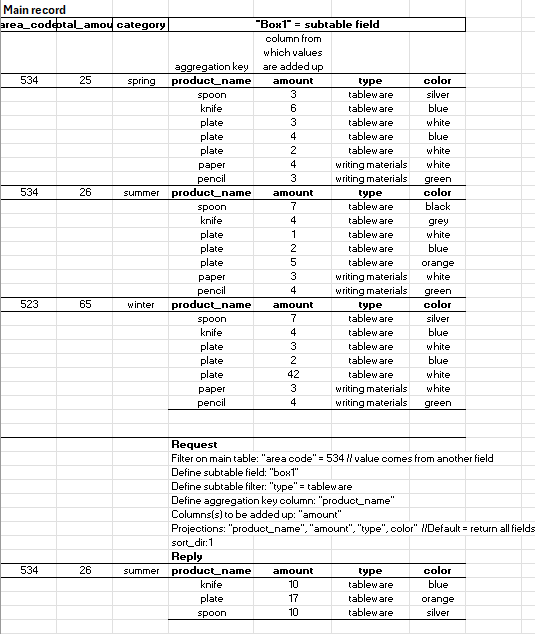
Question: How many spoons are in Box1 and Box2 combined?
$final_compute:
"$sum($col($filter(c3 + c4, {'c0':'spoon'}), c1))"
Question: How many tableware positions are in Box1
$final_compute:
"$count($col($filter(c3, {'c3':'tableware'}), c0))"
Stage $final_map#
Allow easy re-ordering of the result.
Parameter c0-99: (cx) defines mapping with
source-cx: target-cxParameter exclusive: (bool, optional, default false) if true, only the mentioned colunmns will be in the output.
Example {"$final_map": {"c1": "c2", "c2": "c5", "exclusive": true}}
This example produces a c1 from previous c2 and a c2 from c5. All other columns will be excluded, due to the exclusive parameter.